Thirteen screens.One well-travelled app.
Real screens from the app. No mockups, no promises we can't keep. Every tool below is free to use by hand; the Pro chip marks where AI, flights and sharing come in.
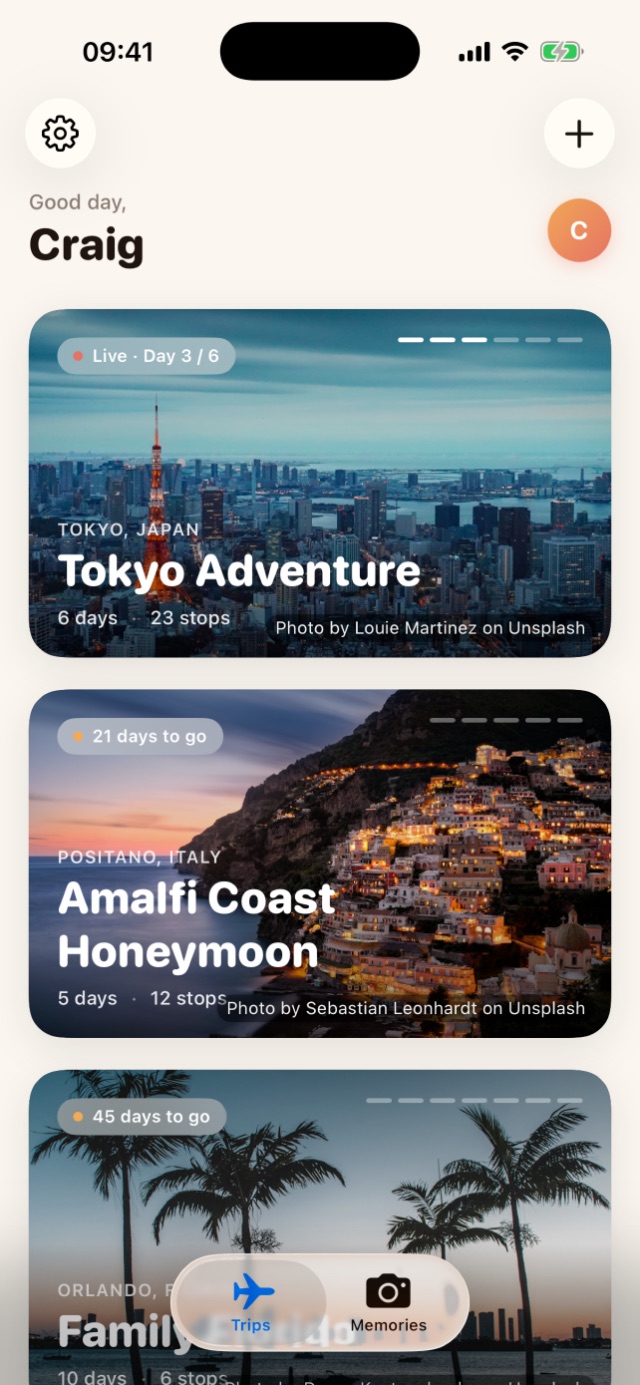
Your trips, pinned like postcards.
Every trip is a full-photo card. The live one sits on top with a day counter, the next ones count down behind it. Three tabs: Trips for what's ahead, Ideas for what you're dreaming about, Memories for everywhere you've been.
- Cover photos found for you, or your own, cropped how you like
- Start from scratch, from one of six city templates, or let AI suggest where
- A Trip Countdown widget for your Home Screen and Lock Screen


Days that plan themselves, if you let them.
Each day is a photo card carrying its own weather, status chip and highlights, yours to build and rearrange by hand. The purple buttons are the Pro magic: Plan with AI drafts a whole day around your pace and fifteen interests, and Get ideas streams real places straight onto the map.
- Booking emails and PDFs read with Apple Intelligence: flights, hotels, trains, tables, tickets
- Links saved from Safari land on a day or in "saved for later"
- Multi-city trips: chain destinations, each with its own dates Pro


From first temple to last lemon sour.
Open today and there's no thinking required. The Next up card names the moment, Directions and Get a ride sit right beneath it, and the schedule scrolls in order with your notes attached.
- Drag an activity to move it, snapping to the quarter hour
- Walk, transit or drive times between stops before you commit
- Book a table through OpenTable, TheFork, Resy, Tabelog and more

The day lives outside the app.
On trip days a Travel Day Live Activity appears by itself. What's happening now, what's next and how long you've got, on the Lock Screen, in the Dynamic Island and in the Apple Watch Smart Stack. It matches your theme, or you can pin it to one you prefer.
A countdown to the next stop and a progress bar for where you are in the day.
A flight or train underway, with the arrival time on the arrival city's clock.
When the day wraps, a quiet prompt to add a line to your journal while it's fresh.
- Free, with the Trip Countdown widget included
- Live flight status folded in: gate, terminal, delays, baggage belt Pro
Type the flight number. Wandrr does the rest.
Type BA432, tap Find, and the whole leg fills itself in from the airline's schedule: both airports with map pins, times on each airport's own clock, the airline, the aircraft, and the terminal saved to your notes. One field instead of eight.
- Schedule watch: for flights in the next 72 hours, if the airline moves it, your itinerary moves too and you get a notification Pro
- Live status near departure, on the flight sheet and the Live Activity Pro
- Cancellations are flagged for you to check with the airline, never silently rewritten
- On a shared trip, corrected times reach every travel companion

The holiday maths, done kindly.
JP¥259,800 spent, JP¥140,200 left, and the bar stays green and honest. Log spends by hand and the categories tally themselves. Spending by day shows whether you're ahead of an even pace or treating yourself.
- Multi-currency that is never silently converted: "£1,200 + €300" stays exactly that
- A converter with live rates, or your own bank's rate if you prefer
- A lifetime Spending view in Settings, totalled per currency across every trip
- Point the camera at a receipt and the amount is read for you Pro

Seven little tools, zero extra apps.
One sheet holds the kit: Budget, Near Me, Trip Ideas, Packing, Photos, Wallet for passports and tickets, and the Phrasebook. Every tool is free to fill in yourself.
- Packing with quantities, satisfying tick-offs and a progress bar
- Star the things you always forget. Favourites follow you to every trip
- Near Me: coffee, pharmacy, ATM, supermarket, with Apple's place cards
- Tap the wand and AI writes the packing list for the destination and trip length Pro


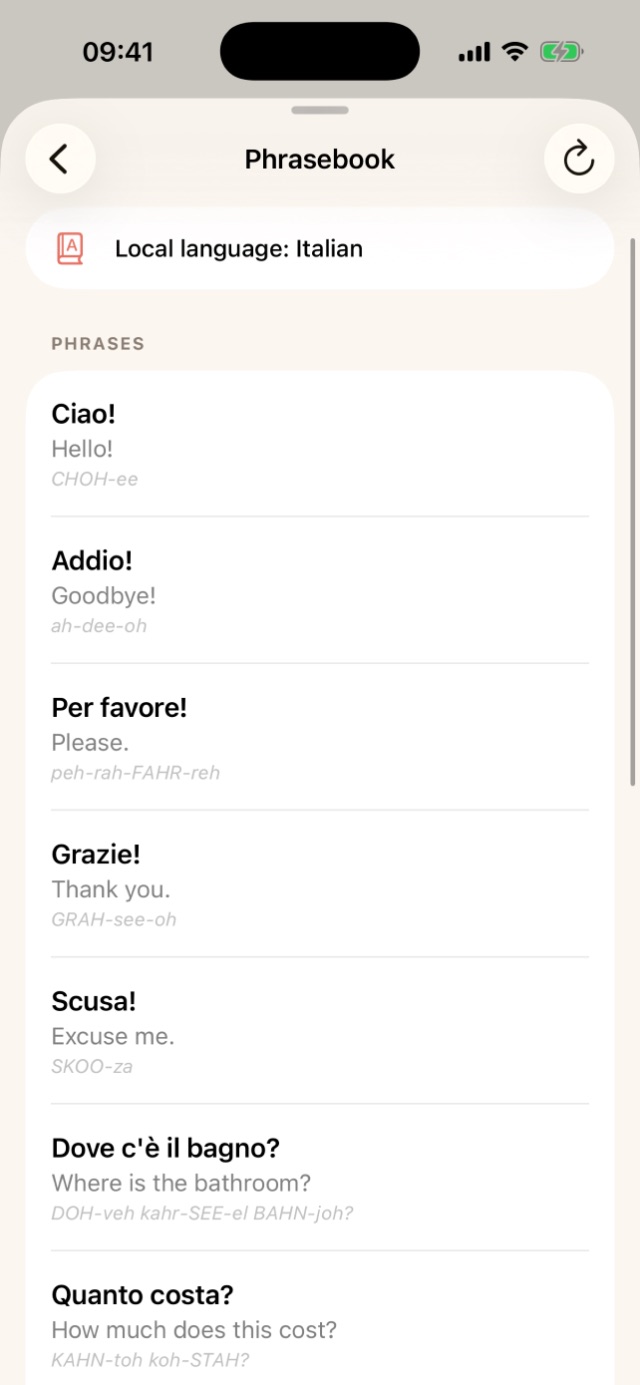
Sound less lost in eleven words.
Set your trip's language and keep the lines you'll actually need in one place, each with the translation and how to say it. Add your own phrases free; on Pro, AI writes a whole local phrasebook and caches it on the trip so it works with no signal.
- The Wallet: passports, visas, insurance and boarding passes, by camera or from Photos
- Kept in your own private iCloud, never on our servers
- AI phrasebook, generated with Apple Intelligence Pro
"GRAH-see-eh". Nailed it. 🇮🇹
Dream it together before anyone books anything.
A board is where "we should go here one day" lives. Everyone drops in places, notes and links. Heart what you love; when two of you heart the same idea it becomes Agreed, and one tap moves the agreed pile into a real trip.
- Shared live over iCloud, with everyone's hearts in sync
- Friends join and collaborate for free. A demo board shows you the loop
- Create and share your own boards Pro


Everywhere you've been, on one shelf.
Finished trips gather in Memories. Tap the globe and a world map shows every country you've coloured in, with upcoming trips faded in blue. Tap the flag button and every visited country flies its flag instead. New countries arrive under scratch-off foil you rub away with a finger.
- Colour view or flag view, pinch to zoom, tap to flip to greyscale
- A journal built from your days, with a mood, notes and photos per day
- Photos copied into the trip so they survive library clear-outs and sync over iCloud
- Unlimited journal photos. Free keeps one per entry Pro


Six sunsets, eleven stops, 145 km on foot.
Every finished trip gets a recap: sunsets seen, stops made, photos taken, kilometres explored, journal notes written, and what it all cost. Underneath, a strip of snapshots and a map of everywhere you went, numbered in order.
- Steps and distance from Apple Health for the trip dates, read only, never written
- A per-day walking chart with your most active day highlighted
- A "Welcome home" note when you land, and the trip moves to Memories


Dress your trips the way you travel.
Souvenir, Bento and Evergreen. All free, switchable mid-trip from the paintbrush in the toolbar, and your plans stay exactly where you left them. The Travel Day Live Activity follows along, or can be pinned to a theme of its own.

Send it, share it, print it.
Plan with the people you're travelling with, or hand a finished plan to someone who isn't.
Shared trips Pro
Invite a travel buddy over iCloud. Read-write companions edit activities, links and journal entries and everything syncs both ways, with a live sync indicator. Joining someone else's trip is free.
PDF trip pack Pro
A printable pack with a cover page, one page per day with timed rows and confirmation numbers, plus the packing list and budget at the back. For the parents, or the glovebox.
Trip file Pro
Send a whole trip as a .wandrr file through Messages or Mail. Opening it on another iPhone imports everything: days, stops, notes and links.
Share sheet Free
Save a hotel page from Safari, a restaurant from Instagram, or long-press a PDF boarding pass in Mail. It waits in an inbox until you file it into the right trip or board.
Like where this is going?
It's on the App Store now. Your first two trips are free, with every tool above.